
ExtractNow
Free archive extraction utility for Windows. Extract multiple compressed files with one click effortlessly.

ExtractNow — Key Facts
- Latest Version
- 4.8.3.0
- License
- Free
- Platforms
- Windows
- Category
- Archivers
- Price
- Free to download
- Official Site
- www.extractnow.com
- User Rating
- ★ 4.2 / 5 (566 ratings)
- Tags
- free, lightweight, portable, windows
ExtractNow Screenshots
About ExtractNow
ExtractNow is a lightweight utility designed specifically for extracting compressed archives. No frills here — it does one thing and does it well. Perfect for users who regularly work with multiple archive files and need to extract them quickly. This isn't an archiver for creating compressed files; it's purely focused on extraction. The focused approach keeps the tool simple and efficient.
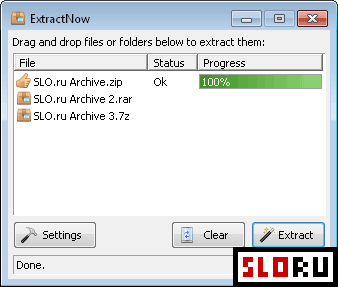
What makes ExtractNow stand out is its straightforward interface and speed. Beginners and advanced users alike appreciate the drag-and-drop functionality — just toss your archives into the window and hit Extract. That's it! No complicated menus. No confusing options. Archivers tools don't get simpler than this. The minimalist design actually works in your favor when you need to process batches of files fast.
The format support is genuinely impressive. Beyond the usual RAR, ZIP, and 7Z standards, ExtractNow handles dozens of additional formats: tar, gzip, bzip2, cab, iso, ace, sit, rar, xz, ppmd, and many others. Whether you're dealing with legacy ACE files or modern XZ compression, this utility has you covered. The program supports jar, xpi, tbz2, lha, lzh, lzma, udf, xar, dmg, msi, swm, chm, rpm, deb, cpio, and split archives too. Check out our Free Windows tools for more extraction solutions.
ExtractNow is available for Windows systems and remains completely free to use. No ads. No registration required. No hidden costs. For users seeking efficient batch extraction without bloatware, this lightweight utility delivers exactly what you need.
ExtractNow is a free archivers available for Windows. Browse more free software or lightweight programs.