PowerArchiver logo

PowerArchiver

Version 18.00.48  ·  Updated: June 4, 2026
Freemium Windows ★ 3.9 (160 ratings)

Powerful archive manager with multi-format support, disk burning, and FTP capabilities for Windows users.

A. Lynch
A. Lynch
Software Analyst
LinkedIn ↗

PowerArchiver — Key Facts

Latest Version
18.00.48
License
Freemium
Platforms
Windows
Category
Archivers
Price
Free to download
User Rating
★ 3.9 / 5 (160 ratings)

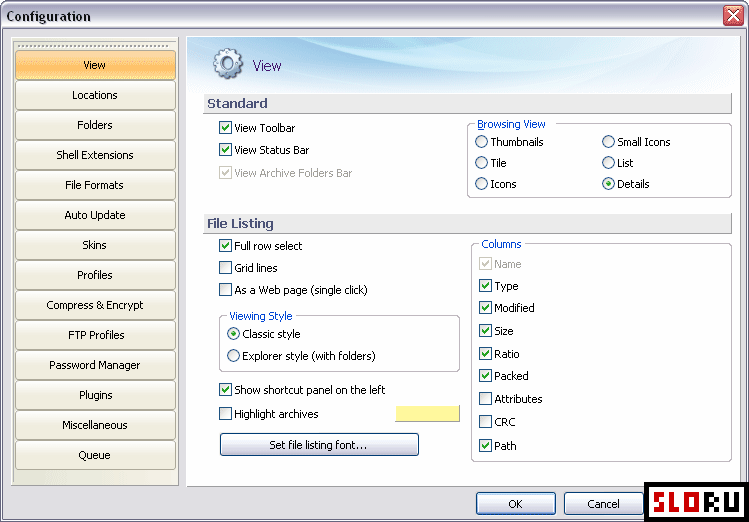
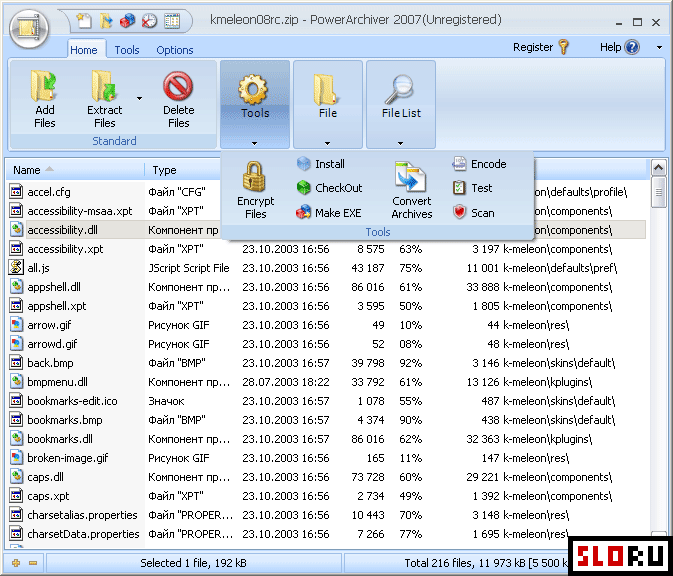
PowerArchiver Screenshots
About PowerArchiver

PowerArchiver is a powerful archiver designed to handle everything you need for file compression and management. This comprehensive tool supports all major archive formats including ZIP, RAR, 7z, and TAR, making it ideal for Archivers work. The advanced interface combines intuitive design with professional-grade functionality, allowing both beginners and power users to work efficiently with compressed files.

Beyond basic compression, PowerArchiver offers an impressive suite of additional features that set it apart from standard archive utilities. The software includes disk burning capabilities, virtual CD-drive support, an integrated FTP client, and backup functions for protecting your important data. Multi-threaded processing technology enables significantly faster operations compared to competing programs—performance gains can reach 300-400% when utilizing modern multi-core processors. The Windows application also provides built-in viewers for text and graphics files, streamlining your workflow without requiring external programs.

The user interface draws inspiration from Microsoft Office's ribbon design, though a classic toolbar option remains available for traditionalists. Full compatibility with Windows 7, Windows 8.1, and newer versions ensures reliable operation across different system environments. Whether you're archiving documents, creating backups, or managing disk images, PowerArchiver delivers professional-grade compression tools with extensive customization options. Explore Free alternatives and other Archivers solutions to find the perfect fit for your specific needs. The software's feature-rich environment makes it particularly valuable for users who demand more than basic compression capabilities.

PowerArchiver is a freemium archivers available for Windows. Browse more free software or portable programs.

Frequently Asked Questions

Is PowerArchiver free to download and use?
PowerArchiver is available as freeware with basic compression features included at no cost. However, the full version with advanced capabilities like disk burning, FTP client, and backup functions requires a paid license (approximately $50). The free tier provides essential archiving functionality for standard compression needs, making it accessible to users on any budget.
What archive formats does PowerArchiver support?
PowerArchiver supports all major compression formats including ZIP, RAR, 7z, and TAR files. Beyond traditional archives, the software handles disk images and various text and graphics file types. This comprehensive format compatibility eliminates the need for multiple specialized tools, simplifying your file management workflow significantly.
What makes PowerArchiver faster than competitors?
PowerArchiver utilizes multi-threaded processing technology that takes full advantage of modern multi-core processors. This optimization can deliver performance improvements of 300-400% compared to standard archiving tools. The enhanced speed becomes particularly noticeable when compressing large files or batch processing multiple archives simultaneously.
What additional features beyond compression does PowerArchiver offer?
PowerArchiver includes disk burning, virtual CD-drive emulation, integrated FTP client functionality, and comprehensive backup tools. Built-in file viewers for text and graphics formats eliminate switching between programs. The ribbon-style interface (similar to Microsoft Office) provides intuitive access to all features while maintaining a classic toolbar option for experienced users.
A. Lynch
Reviewed by A. Lynch
Software Analyst · PowerHypnosis Free App Hub
A. Lynch is a software analyst and writer covering free and open-source software for Windows, Mac and Linux. He has been reviewing software tools since 2010.
View LinkedIn profile ↗
Program Details
Version18.00.48
LicenseFreemium
PlatformsWindows
Developerwww.powerarchiver.com
UpdatedJune 4, 2026
CategoryArchivers
User Rating
3.9
160 ratings
More in Archivers
Browse by Platform