WinZip logo

WinZip

Version 26  ·  Updated: June 4, 2026
Free Windows ★ 4.0 (375 ratings)

Powerful file archiver with graphical interface. Create, extract, and manage compressed files easily.

A. Lynch
A. Lynch
Software Analyst
LinkedIn ↗

WinZip — Key Facts

Latest Version
26
License
Free
Platforms
Windows
Category
Archivers
Price
Free to download
Official Site
www.winzip.com
User Rating
★ 4.0 / 5 (375 ratings)

WinZip Screenshots
About WinZip

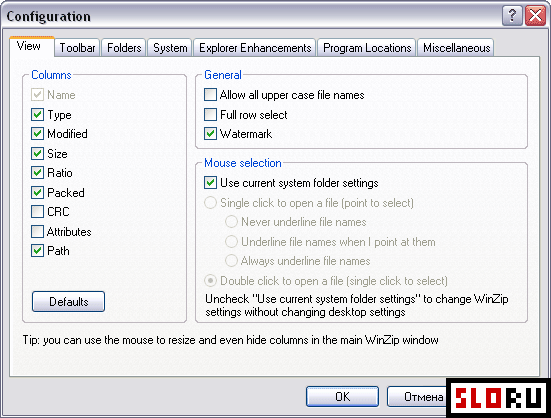
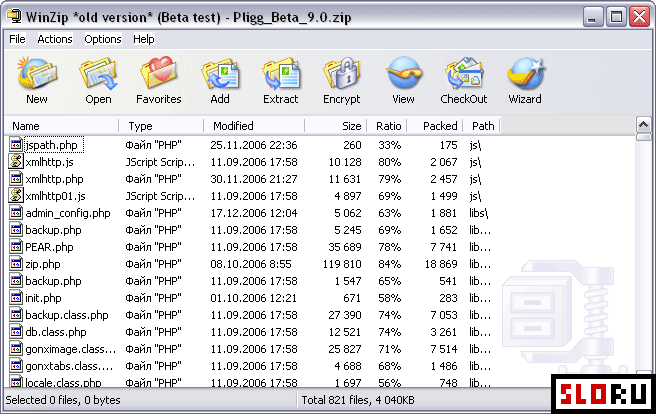
WinZip version 26 stands as the industry standard for file compression and archiving. As the first archiver to introduce a graphical user interface, WinZip revolutionized how users interact with compressed files. Even today, its intuitive and feature-rich interface sets the benchmark for accessibility and functionality in the Archivers category.

This powerful compression tool supports an extensive range of formats, ensuring compatibility with virtually any archive you encounter. Whether you're working with ZIP, RAR, GZIP, 7Z, ARJ, ARC, CAB, LZH, TAR, or Unix-based formats like Compress and Uuencode, WinZip handles them all seamlessly. The program excels at managing large archives efficiently, making it ideal for Windows users who need reliable file compression capabilities.

Beyond basic compression, WinZip offers advanced features that enhance your workflow. Built-in encryption tools protect sensitive data, while the backup functionality helps safeguard important files. Email integration allows you to send compressed archives directly to contacts without leaving the application. These additional capabilities make WinZip suitable for both personal and professional use.

For users prioritizing high performance and compact file sizes over advanced features, exploring 7 Zip or WinRAR may provide excellent alternatives. However, WinZip's polished interface and comprehensive feature set continue to attract millions of users worldwide seeking a complete archiving solution.

WinZip is a free archivers available for Windows. Browse more free software or portable programs.

Frequently Asked Questions

Is WinZip free to download?
WinZip offers a free version for basic file compression and extraction tasks. The full version with all advanced features like encryption, backup tools, and email integration is available as a paid option. Users can evaluate the free version before deciding to upgrade to premium functionality.
What file formats does WinZip support?
WinZip supports a comprehensive range of archive formats including ZIP, RAR, GZIP, 7Z, ARJ, ARC, CAB, LZH, TAR, MIME, Unix Compress, Uuencode, Xxencode, and BinHex. This wide compatibility ensures you can work with virtually any compressed file format you encounter in your daily tasks.
Is WinZip safe to use?
Yes, WinZip is safe and has been trusted by millions of users since being the first archiver with a graphical interface. The software includes built-in encryption features to protect sensitive files. Always download from official sources to ensure you receive the legitimate version without bundled unwanted software.
What are the best alternatives to WinZip?
Popular alternatives include 7-Zip and WinRAR, both offering excellent compression capabilities and broad format support. 7-Zip is known for high compression ratios and minimal resource usage, while WinRAR provides similar functionality with strong reliability. Your choice depends on whether you prioritize advanced features like email integration or prefer lightweight performance.
A. Lynch
Reviewed by A. Lynch
Software Analyst · PowerHypnosis Free App Hub
A. Lynch is a software analyst and writer covering free and open-source software for Windows, Mac and Linux. He has been reviewing software tools since 2010.
View LinkedIn profile ↗
Program Details
Version26
LicenseFree
PlatformsWindows
Developerwww.winzip.com
UpdatedJune 4, 2026
CategoryArchivers
User Rating
4.0
375 ratings
More in Archivers
Browse by Platform